

Autopilot Review: Never Overpay for a Flight or Hotel Again
After you book a flight, the price can still drop. If you are not checking it often, you may never notice. Many travelers know they could keep checking fares using a flight price tracker, but few want to babysit Google Flights and then scramble to rebook before the deal disappears.
That is where Autopilot comes in. It is built to reprice paid flights automatically, with extra tools for upgrades and award tracking. If you are trying to decide whether it is worth using, the answer depends on how you book, how often you fly, and whether airline credit would actually help you.
Table of contents
Autopilot started with flight repricing, but it now also tracks hotel reservations and can rebook them when rates drop.
What Autopilot does, and how it saves you money after you book
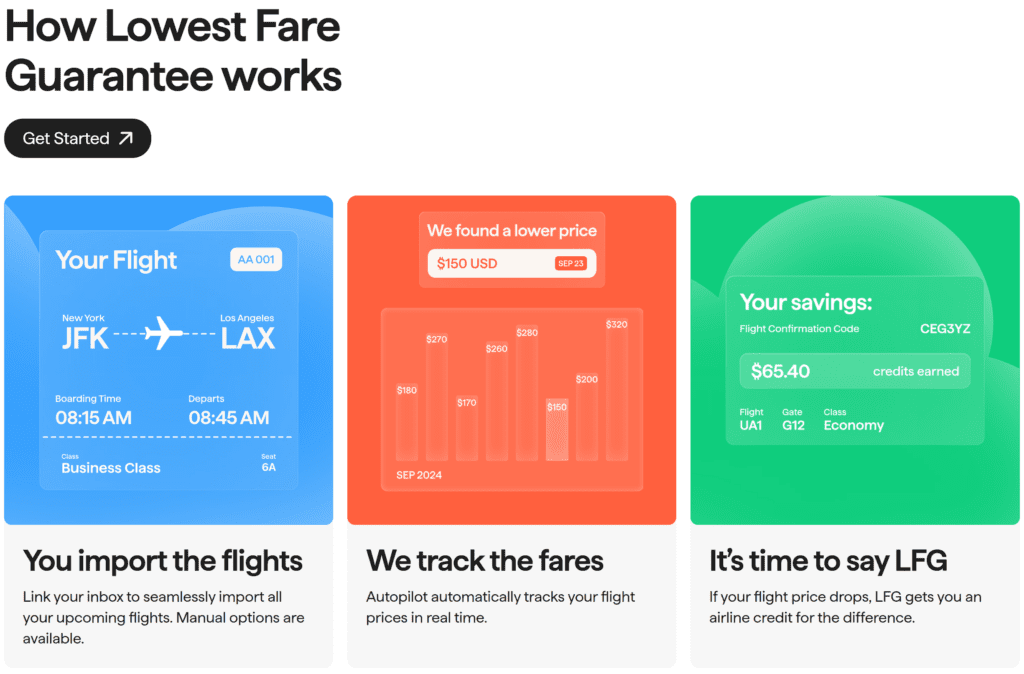
Autopilot is a post-booking flight price tracker. You book your flight as usual, then add the reservation to Autopilot. The service watches the same trip for price drops and, when a qualifying lower fare appears, it performs automatic flight repricing for you.
You can add a reservation through Gmail scanning, by forwarding a confirmation email, or by entering the booking manually. After that, Autopilot checks fares throughout the day. If a qualifying cash fare drops by at least $20, the system can reprice it automatically.
This became possible after major US airlines like American, Delta, and United removed most change fees on standard economy and higher fares. That is also why support for many international airlines may take longer to expand.
The good news is that the same itinerary, seats, and confirmation number usually stay intact. How you receive the savings depends on the ticket type:
- Refundable tickets may send money back to your original card.
- Nonrefundable fares usually turn the savings into airline credit.
Autopilot also offers award tracking and seat upgrade alerts on higher tiers.
Autopilot has also expanded into hotel repricing. It works with flexible, non-prepaid direct hotel bookings, and it currently supports Marriott, IHG, and Hyatt, with Hilton still to come. If the rate drops by at least $5, Autopilot rebooks the stay at the lower price and cancels the original reservation. The stay itself does not change, but the confirmation number does.
Additionally, Autopilot includes upgrade bidding. Travelers can set a maximum budget for a seat upgrade, and if the airline offers one below that amount, Autopilot can process it automatically. Pro users can also get upgrade alerts when prices drop below a set threshold, which gives them a chance to act without committing right away. The upgrade fee is 25% of the upgrade cost, but Autopilot never goes over the customer’s set maximum.
How the repricing process works
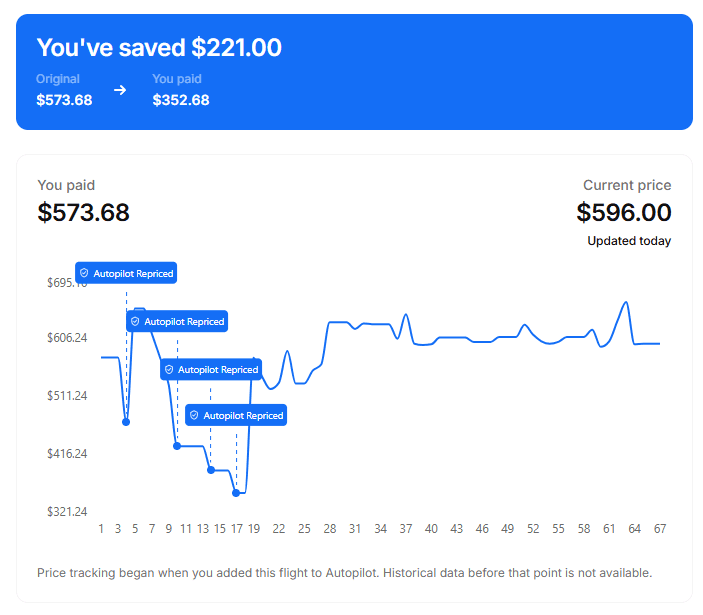
It starts with a direct booking. You book your flight directly with the airline or hotel, then add the trip to Autopilot so it can keep an eye on the fare. If the price drops enough to qualify, Autopilot steps in and reprices the ticket for you.
Airline fares can update several times a day, which is part of what makes the tool useful. A person might miss the change or see it too late, but software can catch it much faster.
You are still in control, too. If you do not want Autopilot watching a trip anymore, you can turn tracking off in the app. That is helpful if your plans change, if you want to manage the booking yourself, or if you are waiting on a trip where you want to stay hands-on.
How Autopilot is different from Google Flights alerts
Google Flights can already track prices for free, but that is where the similarity ends.
The big difference is automation. Google sends you an alert when a price changes, but you still have to open the email, check the fare, and rebook it yourself. If you are at work, in transit, or away from your phone, the deal can disappear before you get to it.
Autopilot takes that extra step off your plate. It watches the fare and handles the repricing for you when the trip qualifies. For busy travelers, that means more than just savings. It also means fewer alerts, less checking, and less time spent watching the same flight over and over.
If you like using a few different travel tools together, this fits well with other best tools for points and miles travel planning. It just solves a different part of the trip.
Autopilot Plans and Pricing
Autopilot has two main pricing paths. There is a pay-as-you-save option for automatic cash fare repricing, and there is a Pro plan with more features and lower fees in some cases.
| Plan | Upfront cost | Fee on savings | Best for |
|---|---|---|---|
| Pay-per-win | $0 upfront | 25% fee on qualifying cash fare drops | Casual users who want automatic repricing without a subscription |
| Pro plan | About $9.99/month or $99/year | 15% fee on qualifying cash fare drops, plus award and upgrade features | Frequent travelers who book often |
You pay only when you save. If Autopilot does not save you money, you do not pay a success fee.
Say you book a $1,000 flight, and the same trip later drops to $900. Under the pay-per-win model, you could get $100 in airline credits and pay Autopilot a 25% fee ($25). Your net savings is $75. If the fare later drops again, the system can reprice again and charge a 25% fee only on the new savings.
The tradeoff is worth thinking about. On a nonrefundable ticket, you are often paying a fee now to get airline credit later. That works well if you fly that airline often. If you would not likely use the airline credit, it may not make sense
Who Gets the Most Value from Autopilot
Autopilot makes the most sense for travelers who pay cash for flights several times a year and book directly with airlines. It also fits people who do not want to keep checking fares after they book.
There is another benefit too. Some travelers may feel better booking earlier, knowing Autopilot can keep watch for a lower fare later. That can take some pressure off trying to guess the perfect time to buy.
If you use points sometimes, the Pro tier can still be useful. Award alerts will not rebook the trip for you, but they can still point out a chance to save points.
The new hotel repricing feature expands that use case even more. If you book direct hotel stays and care about points, elite nights, or flexible rates, Autopilot becomes more useful beyond flights.
Frequently Asked Questions
Which flights does Autopilot work with?
Autopilot currently works best with cash tickets booked directly with major US airlines like American, Delta, United, Alaska, and JetBlue. Basic economy usually does not qualify, and third-party bookings through sites like Expedia, Chase Travel, or Amex Travel are typically not supported. Pro users can also track award tickets, but that feature works a little differently.
How do I add a reservation to Autopilot?
There are three ways to import a trip. You can connect Gmail so eligible flight confirmations are added automatically, forward your confirmation email, or enter the trip manually in the app.
Will Autopilot change my seat or put me in basic economy?
No, Autopilot is meant to keep you in the same cabin and on the same itinerary. Your fare class may change, though, and that could affect upgrade priority for some travelers.
What happens if the price drops more than once?
If the fare keeps dropping and each drop qualifies, Autopilot can reprice it again. That means you may be able to earn more than one credit on the same trip.
Does Autopilot work for hotels too?
Yes, Autopilot now also supports hotel repricing for eligible direct bookings. It watches hotel rates and can rebook when the price drops, while keeping the reservation details and loyalty benefits intact.
Final Verdict: should you use it or skip it?
Autopilot is at its best when you book paid flights on supported airlines and want a low-effort way to capture price drops after purchase. In that lane, the product makes a lot of sense.
Autopilot is no longer just a flight savings tool. With hotel repricing now live, it is becoming a broader travel price watch tool, especially for travelers who book direct and want savings without constant checking.
The strongest feature is automatic repricing on cash tickets. Award tracking is useful, but it feels more like a bonus than the main reason to sign up. Upgrade alerts are interesting too, especially if you have a firm ceiling for a better cabin.
Timing airfare is hard, and most people do not want to keep poking at the same reservation for weeks. Autopilot offers a great workaround for that problem.
For the right traveler, Autopilot turns post-booking price drops into a background task. It is not for everyone, but it can be a smart way to catch savings without constant checking.
Related posts:
 Kimpton Grand Roatan Resort and Spa Review: Is This the Ultimate Caribbean Escape for Couples?
 Our Guide to Staying at Antares Bush Camp and Umgede Hide (South Africa Safari Experience)
 Hyatt Regency JFK Review: Is This the Best Hotel Near JFK Airport?
 JFK to Singapore Business Class Review on Points
